
Notion Mail: Reinventing Email Productivity

If you're anything like me, your inbox can feel like a chaotic vortex of endless emails, meeting requests, and to-dos.
But today, I’ve got some exciting news that might just change the way you manage your email: Notion has officially launched Notion Mail, an AI-powered email client designed to bring calm and clarity to your inbox.
Let’s dive into what this launch means for Notion users and why it’s creating such a buzz in the productivity world.
What is Notion Mail?
Notion Mail is the latest addition to Notion’s growing ecosystem of productivity tools, and it’s here to reimagine how we interact with email.
Launched on April 15, 2025, this new email client integrates seamlessly with Gmail (for now) and leverages Notion’s signature flexibility and AI capabilities to streamline your email workflow.
Whether you're a founder juggling partner emails, a sales professional tracking leads, or just someone trying to hit inbox zero, Notion Mail promises to make email work for you—not against you.
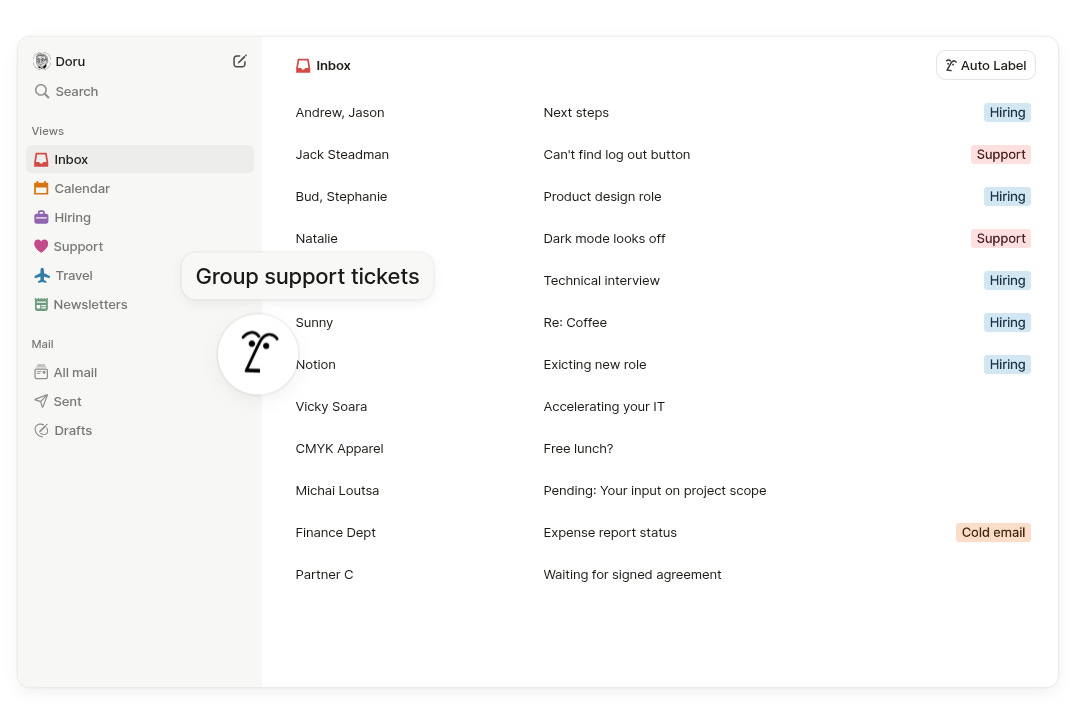
Here’s what sets Notion Mail apart:
AI-Driven Organization: Notion Mail uses AI to automatically sort your inbox based on your priorities. You can set prompts to label emails (think “tag all recruiting emails by stage” or “flag urgent messages from my boss”) and let the AI handle the busywork. It even learns your preferences over time, ensuring the right emails always rise to the top. [Ref web ID: 14] [Ref web ID: 15]
Custom Views for Every Workflow: One of the standout features is the ability to create personalized “views” of your inbox. Need a dedicated space for customer feedback or travel-related emails? Notion Mail lets you set up custom views with filters, so you can focus on what matters most without tab-switching chaos. For example, a sales professional can create a “sales leads” view to track potential deals, while a founder might prioritize emails from key partners. [Ref web ID: 12] [Ref web ID: 15]
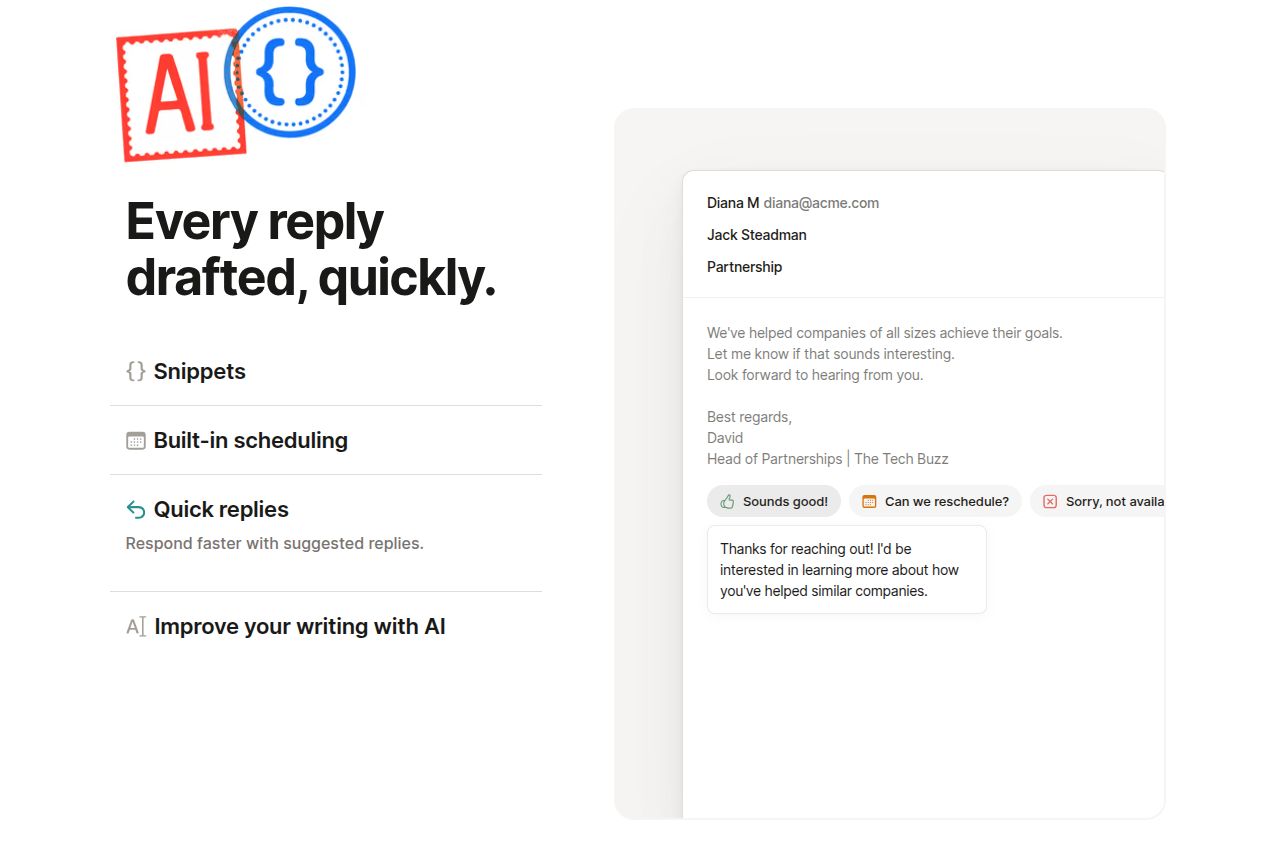
Seamless Scheduling with Notion Calendar: Scheduling meetings just got a whole lot easier. Notion Mail integrates with Notion Calendar, allowing you to insert booking links directly into your emails with a simple “/schedule” command. Recipients can click the link to book a conflict-free meeting based on your availability—no more email ping-pong! [Ref web ID: 8] [Ref web ID: 14]
Familiar Notion Features: If you’re already a Notion user, you’ll feel right at home. Notion Mail supports slash commands, Markdown shortcuts, and even lets you reference Notion pages while drafting emails. Imagine pulling data from your Notion workspace—like a table of your top-rated coffee spots in Berlin—right into an email with the help of Notion AI. [Ref web ID: 9] [Ref web ID: 14]
The Launch: What’s the Buzz About?
Notion Mail has been generating excitement since its announcement, and the official launch has only amplified the hype.
Notion, which now boasts over 100 million users, has been steadily expanding its suite of tools to become the ultimate all-in-one productivity platform.
With the addition of Notion Mail, the company is taking a bold step into the email market, challenging established players like Gmail and Outlook.
The tech community is buzzing with enthusiasm for Notion Mail’s innovative approach.
On X, users have called it “a total game changer” and “the biggest upgrade to email in years,” praising its adaptability and seamless integration with Notion’s ecosystem.
One user even described it as “stunning,” highlighting how it brings calm and organized communication to their workflow.
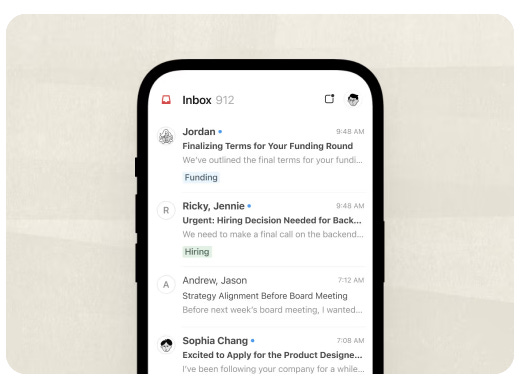
But it’s not all smooth sailing. While Notion Mail launched with a MacOS app alongside its web version, some users on X have expressed frustration over the lack of a mobile app, arguing that mobile support should have been prioritized over a desktop app.
Others have pointed out that Notion Mail currently only supports Gmail, leaving Outlook users waiting for future updates.
There are also calls for multi-account support, with some users hesitant to fully adopt the platform until these “basic features” are added.
Why Notion Mail Matters
Email has long been a pain point for productivity.
Traditional clients like Gmail and Outlook often leave us drowning in a one-size-fits-all inbox, manually triaging emails and juggling multiple tabs to get things done.
Notion Mail takes a different approach, focusing on customization and integration to make email a proactive tool rather than a burden.
As Andrew Milich, Notion Mail Lead, put it, “We’re not trying to make you work faster in the old way of things. It’s really a new way and a new approach.”
For Notion users, the ability to link emails to projects, create tasks, and schedule meetings—all within the same ecosystem—is a huge win.
Imagine receiving feedback on a project via email and instantly attaching it to the relevant Notion workspace, or transforming an email thread into actionable tasks without ever leaving your inbox.
This level of connectivity positions Notion as a serious competitor to productivity suites like Google Workspace and Microsoft 365.
However, it’s worth noting that Notion Mail isn’t a full replacement for traditional email providers just yet.
It’s more of a Gmail wrapper with a Notion interface, meaning it lacks deeper integrations with Notion databases at launch—a point of disappointment for some power users.
Additionally, its AI features, while free with monthly usage limits, require a paid tier for unlimited access, which might deter some users.
What’s Next for Notion Mail?
Notion has big plans for Notion Mail. The team is already working on expanding compatibility to include Outlook and other email providers, and an iOS app is in the pipeline for the near future.
There’s also talk of adding support for multiple inboxes in one view, which would address one of the biggest pain points for users managing multiple accounts.
Looking ahead, Notion Mail could become a cornerstone of Notion’s mission to be the one-stop productivity app for individuals and teams.
With its acquisition of Skiff in 2024 (a privacy-focused email service that inspired Notion Mail’s infrastructure), Notion has the foundation to innovate further—though it’s worth noting that the shift away from Skiff’s end-to-end encryption has disappointed some privacy-conscious users.
Should You Try Notion Mail?
If you’re a Notion user who relies on Gmail, Notion Mail is absolutely worth checking out.
Its AI-driven organization, custom views, and seamless integration with Notion Calendar make it a powerful tool for managing email in a way that aligns with your workflow. Plus, it’s free for all Notion users (with optional paid AI features), so there’s no cost to giving it a spin.
That said, if you’re an Outlook user or someone who needs mobile access right away, you might want to hold off until Notion rolls out broader compatibility and a mobile app.
And if you’re a privacy-focused user, you might be wary of Notion’s decision to integrate with Google Workspace instead of prioritizing encryption.
Final Thoughts
Notion Mail is a bold step toward reimagining email management, and its launch marks an exciting moment for Notion users.
By combining AI, customization, and deep integration with Notion’s ecosystem, it offers a fresh take on a tool we all love to hate.
While it’s not perfect—mobile support and broader compatibility are still on the horizon—it’s a promising start that could redefine how we approach email productivity.
Ready to give it a try?
Head over to Notion’s website to sign up and start exploring Notion Mail today. And if you’re already using it, I’d love to hear your thoughts—drop a comment below and let me know how it’s working for you!
Until next time, stay productive!